XT Server
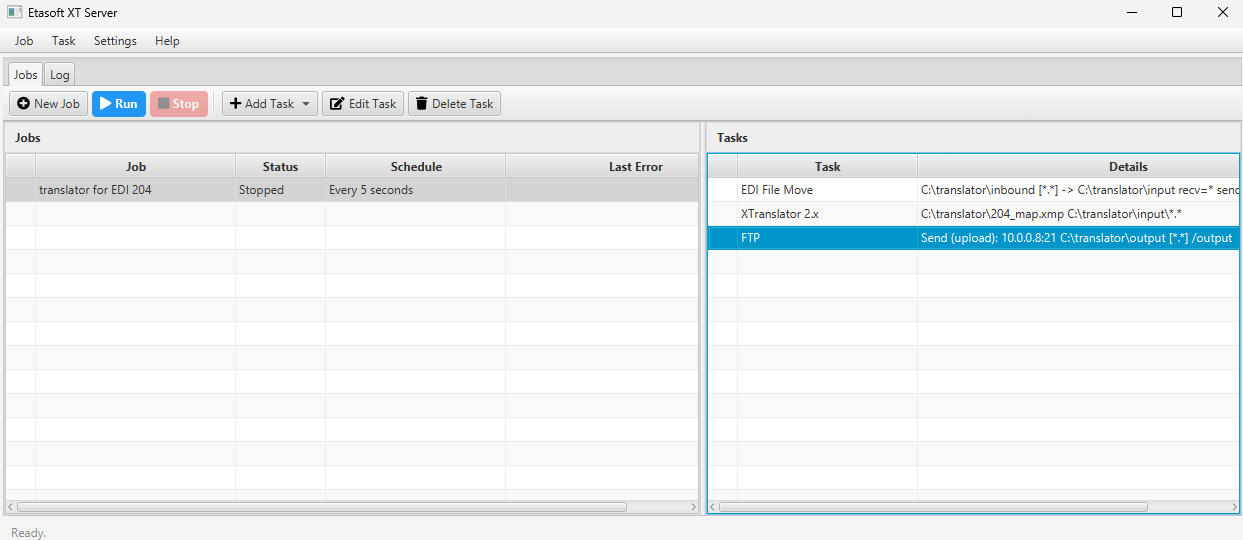
XT Server version 3.0. Automate XTranslator processing. Run related EDI tasks on schedule.
Download Windows Installer
Free to use, no trial, Windows: 10 or 11, Server 2022, 2025. Unzip then run installer.
Key Features
- Job Scheduling & Automation
Create timed automation workflows that run on custom schedules (every 5/10/30 seconds, every minute/hour/day) or execute once on demand. Jobs automatically resume on startup when Auto-Start is enabled. - Rich Task Library
Build heterogeneous jobs with 12+ task types including Email, Execute Command, File Operations (copy/delete/move), FTP/SFTP, EDI file copy and move, X12 EDI splitting, XTranslator 2.x integration, Pause/Timeout, and Log Messages — all with visual field editors. - EDI X12 Processing
Split EDI X12 files into individual ISA/IEA envelopes with normalized counts, or perform EDI file copy and move operations with sender/receiver ID support. - Real-Time Log Viewer
Dedicated Log tab with a searchable, filterable event table. Search with wildcard support (e.g.*error*), filter by job or task, sort by timestamp, and export the full log history to a file. - Centralized Log Storage
All logs are persisted in an embedded database with automatic rotation, plus backward-compatible per-job CSV sidecars. The built-in trim limit keeps database size manageable while preserving history. - Job Cloning & Portability
Clone existing jobs in one click to replicate complex task sequences, or export/import jobs as YAML files to share configurations across environments or versions. - Intelligent File Matching
The File Matcher task checks whether files matching a glob pattern exist or contain specific text, enabling conditional job logic. Used internally as the "stop/continue" signal for FTP receive and other file-driven workflows. - Deferred Error Email Notifications
Configure tasks withSend On Errorto queue notification emails that are dispatched only when a job reaches an error state, rather than on every run. Avoids noisy logs for routine failures. - Custom Command Execution
TheExecute Programtask runs arbitrary external programs with parameter substitution, logging stdout on success. - FTP/SFTP File Transfer
Upload or download files with configurable retry logic, optional FTPS (SSL) or SFTP (SSH) transport, and pattern-based remote directories. Max retries and connection timeouts are user-configurable per task. - XTranslator 2.x Integration
Add XTranslator tasks to run data translations combined with other related tasks.